
Please note that Baseline functions are only available to Moderator users and higher. You will only follow these directions if pushing down a Baseline that is not related to a Project.
To push a Baseline to an existing location:
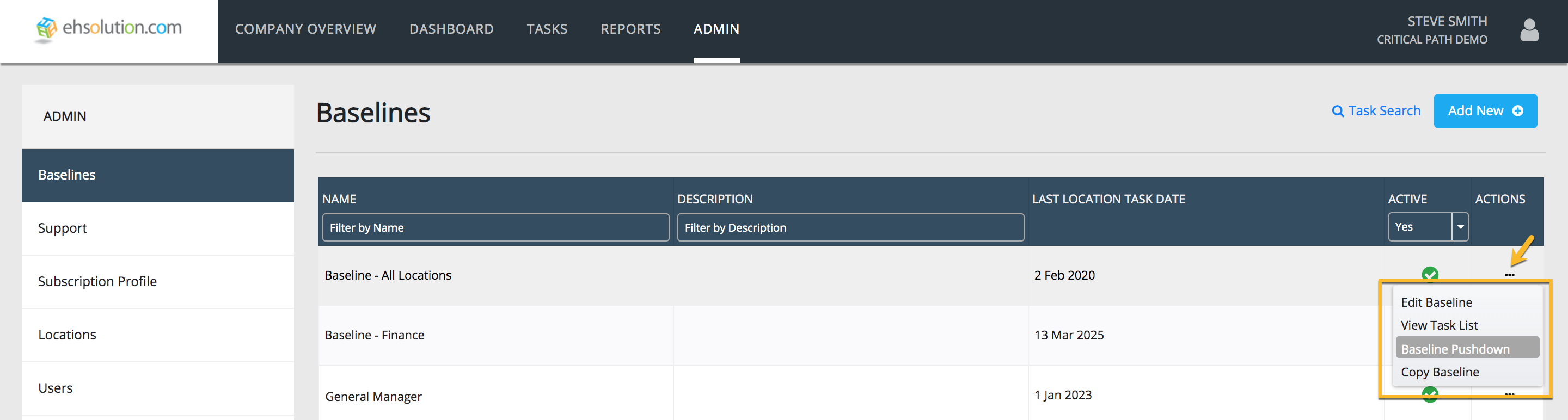
- Select Admin on the header bar
- Select Baselines on the left-hand menu
- On the Baseline you’d like to push, Select the “…” in the Actions column
- Select “Baseline Pushdown” from the dropdown menu
- Search for the Location(s) to push your Baseline to and Select the Add button
- Select Push button at bottom of slide-out
- Your Baseline Tasks will now appear on the Location’s Tasks Page
**You are you only able to push baselines to Locations that you have access to in the application
Comments
0 comments
Article is closed for comments.